
The Settings Menu provides the following options:
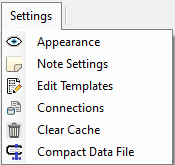
Here are the details for each option:

Select “Appearance” to customize the application look and feel.

Select “Note Settings” to customize the default settings for new notes.

Select “Edit Templates” to create and customize templates for new notes.

Select “Connections” to set the default Book File (.bslf file) and email client.

Select “Clear Cache” to delete temporary files immediately or set to automatically delete temporary files on application exit.

Select “Compact Data File” to rebuilds the database file and repack it into a minimal amount of disk space.